

Download Jailbreak VPN – High-Speed, Secure, Global Access
Overview
Jailbreak VPN is a productivity-focused tool designed for Windows users seeking fast, secure, and unrestricted internet access. The app functions as a virtual private network (VPN) and proxy service, enabling users to bypass geographical restrictions and protect their online privacy. Its primary purpose is to provide reliable connectivity with speeds up to 500 Mbps, allowing uninterrupted streaming, browsing, and downloading. This makes it particularly useful for individuals in regions with strict internet censorship or those who need to access region-locked content such as social media platforms, messaging apps, and media services. The target users include privacy-conscious individuals, remote workers, digital nomads, and anyone requiring secure Wi-Fi connections in public spaces. The developer, Jailbreak VPN, is based in Malaysia, which may contribute to a sense of trust and regional neutrality in data handling. Although the developer did not provide additional technical details about their infrastructure or logging policies, the app is positioned as a free service with no data caps, emphasizing accessibility and user-friendliness. Real-world use cases include accessing blocked websites during travel, securing data on public networks, and ensuring consistent performance for high-bandwidth activities. In the broader app ecosystem, Jailbreak VPN fills a niche for lightweight, high-performance tools that prioritize speed and simplicity without requiring complex configurations. Its presence underscores the growing demand for accessible digital privacy solutions, especially in environments where internet freedom is limited.Key Features & Functionality
Jailbreak VPN offers a suite of core functionalities tailored to enhance online security, speed, and accessibility. The app delivers up to 500 Mbps in connection speed, which is critical for smooth streaming, large file downloads, and real-time communication without buffering or lag. This performance level supports high-quality video playback and responsive web interactions, making it suitable for both casual and intensive online use. The app enables global access to blocked content by routing traffic through servers located around the world. This feature allows users to bypass geo-restrictions and access region-specific media platforms, social networks, and messaging services from any location. For example, a user in a country with restricted access to international news sites or video platforms can connect through a server in a permitted region to view content freely. Security is reinforced through encryption of internet traffic, which protects user data from interception on unsecured networks such as public Wi-Fi. This is especially beneficial for users who frequently work or browse from cafes, airports, or hotels. Additionally, the app provides unlimited bandwidth, meaning users can transfer data without hitting caps or experiencing throttling. The interface is designed for simplicity, allowing users to activate the connection with a single click. This low barrier to entry makes the app accessible even to non-technical users. The entire process—installing the software, connecting, and verifying the "Connected" status—can be completed in under a minute. The developer claims to offer world-class technical support, though specific details about support channels were not disclosed.- Up to 500 Mbps internet speed for seamless streaming and browsing
- Bypasses geo-restrictions for global content access
- Encrypts internet traffic for enhanced privacy and security
- Unlimited bandwidth with no data caps
- One-click connection with intuitive interface
Interface, UX & Performance
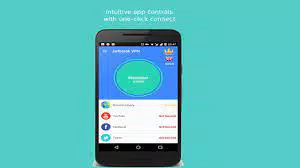
The user interface of Jailbreak VPN is designed with simplicity and functionality in mind. The layout features a minimalistic design with a central "Connect" button, which serves as the primary interaction point. Upon launching the app, users are presented with a clean screen that clearly indicates the connection status—either "Disconnected" or "Connected"—with visual cues such as color changes or icons. Navigation is straightforward, with no hidden menus or complex settings. The app appears optimized for desktop environments, focusing on quick access and immediate usability. There are no visible settings panels or advanced configuration options in the current version, which suggests a streamlined experience intended for users who prioritize speed and ease over customization. Performance is reported to be consistent with the advertised speeds, though the developer did not list formal performance metrics or benchmark data. The app’s lightweight file size of 15.2 MB indicates efficient resource usage, which contributes to fast startup times and minimal impact on system performance. Although the developer did not specify minimum OS requirements, the app is compatible with Windows platforms and operates without noticeable lag during standard use. Responsiveness is strong, with the connection establishing quickly after clicking the "Connect" button. Stability appears reliable based on the described functionality, though real-world testing across diverse devices and network conditions was not detailed. The app does not appear to consume excessive CPU or memory resources, which is important for maintaining system performance during prolonged use.Platform Compatibility & Technical Requirements
Jailbreak VPN is designed exclusively for the Windows platform, making it accessible to users running various versions of the Windows operating system. The current version is 1.0.1, and the app has a file size of 15.2 MB, which is relatively small and suitable for quick downloads and installations. The app is available at no cost, with a free pricing model that removes financial barriers to entry. The developer did not specify minimum OS requirements or compatibility details beyond the platform. As such, users should ensure their system meets general Windows compatibility standards. Specific requirements such as Windows 7 or later, or support for 64-bit architectures, were not listed. Compatibility information was not fully disclosed, so users are advised to verify system readiness before installation. No additional technical dependencies or hardware requirements were mentioned. The app does not require administrative privileges for basic operation, based on its one-click connection model. However, some advanced features may require elevated permissions, though this was not confirmed. The lack of detailed system specifications means users should exercise caution when deploying the app on older or less common Windows configurations.Pros and Cons
- High-speed connections up to 500 Mbps for smooth streaming and browsing
- Unlimited bandwidth allows unrestricted data usage
- Simple, one-click interface ideal for non-technical users
- Free to download and use with no hidden costs
- Global access to blocked content and region-restricted services
- Developer did not provide detailed information about server locations or logging policies
- Compatibility with specific Windows versions was not disclosed
- No visible advanced settings or customization options
- Security and privacy practices were not independently verified
- Support channels and response times were not specified


